
TripIt: Travel Planner
TripIt, Inc.Travel & Local
4.714.59K Reviews
- Version
- 15.7.0
- Installs
- 5.00M
- Age Rating
- Everyone
Screenshots




Our Review of TripIt: Travel Planner
 Analysis by Appyee
When several people in a household are involved in one trip, the hard part is often not booking anything; it is making sure everyone knows which plan is current. I find TripIt: Travel Planner most useful as a shared reference point for the itinerary, rather than as a replacement for every airline, hotel, or calendar app. That distinction matters: it can bring travel details together, but each traveler still needs a sensible way to access the information that belongs to them.
One trip, several people, fewer scattered messages
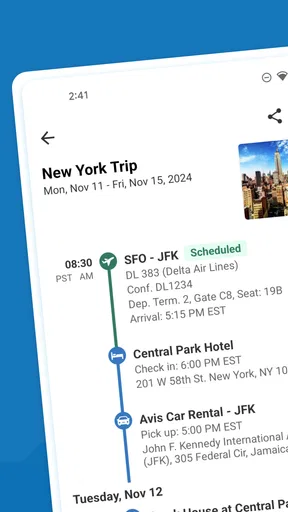
Picture a family leaving early for an airport. One person has the flight email, another has the hotel confirmation, and someone else is trying to remember the car pickup details from a message sent days ago. A consolidated itinerary makes it easier to check the sequence of plans without searching through several inboxes. That is the practical appeal I see here: it gives a group a common outline to consult when the day gets busy.
It is especially helpful when one person handles most of the booking but another person needs to coordinate the day. For example, a partner can share the travel plan so the other person can check departure and lodging details without asking for each confirmation separately. I would still agree in advance who is responsible for keeping the itinerary current. A shared plan only helps if the people arranging the trip add or forward the relevant information as it arrives.
I would not treat an itinerary as a substitute for talking through important changes. If a departure time shifts or a connection becomes tight, a quick direct message is still clearer than assuming everyone has opened an app notification. Used alongside ordinary communication, the app can reduce the routine “what time is that again?” questions without pretending to manage the whole household.
Keep account access and personal details deliberate
For shared-device use, I would be careful about whose account is signed in. Travel plans can contain personal booking details, so using one person’s account on a family tablet may make the itinerary convenient to view but can blur the boundary between that person’s information and everyone else’s. I would avoid passing around a password as a shortcut. Instead, use the app’s sharing option for the specific plan when that suits the group, and keep account access with the person who owns it.
Before a trip, it is worth checking which email address is being used to forward confirmations and whether the person organizing the booking can actually retrieve them. A confirmation sent to a different household member’s inbox will not automatically help the organizer unless it is shared or forwarded. This small bit of preparation can prevent a frustrating last-minute hunt through somebody else’s mail.
There is also a useful boundary between a family itinerary and a person’s full travel history. I would share what the other traveler needs to coordinate the current journey, rather than assuming every detail should be visible to everyone. That approach is more considerate, especially for adults traveling together who may have separate bookings or different preferences about privacy.
Smart Itinerary Organization
Let's dive into the heart of what makes TripIt: Travel Planner so appealing. The app’s main feature is its ability to automatically create a master itinerary. Simply forward your travel confirmation emails to TripIt, and watch as it magically organizes everything into a cohesive schedule. Flights, hotels, car rentals—it’s all there, without lifting a finger. This feature alone is a game-changer, especially for those of us who can’t keep track of email threads.
One of the things I love about the app is how intuitive it is. The interface is clean and easy to navigate. Even if you’re not tech-savvy, you’ll find your way around in no time. It’s like having a personal assistant in your pocket, ready to remind you of where you need to be and when.
Real-Time Alerts and Updates
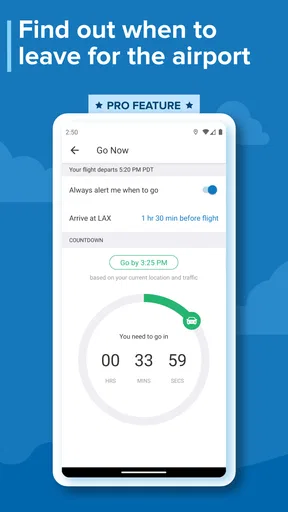
Another standout feature of TripIt is its real-time alerts. If your flight is delayed or your gate changes, TripIt has got your back. The app sends notifications directly to your phone, keeping you in the loop at all times. I found this particularly useful during a recent trip when my flight was postponed. Instead of frantically checking the airline’s website, I just waited for TripIt to update me. It’s like having a travel-savvy friend who's always in the know.
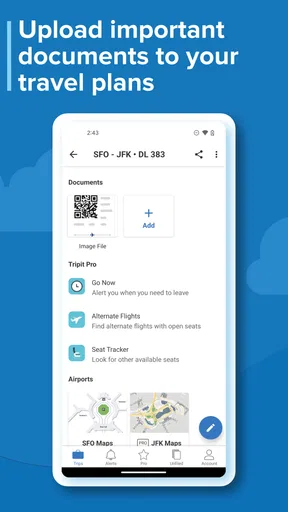
On top of that, TripIt offers a Pro version with even more perks, like finding alternate flights, tracking rewards programs, and more. While the free version is robust, the Pro features might be worth the investment for frequent travelers.
Coordination works best with a clear owner
Sharing an itinerary is most useful when the group agrees on who will maintain it. If one person books the hotel and another books transport, each can forward the relevant confirmation to the organizer, who can then check that the trip outline is complete. This avoids the assumption that every booking will appear automatically just because the trip is in one place. I would do a quick review after the last reservation arrives, especially if plans were made across multiple email accounts.
For a simple weekend away, I would keep the itinerary focused on the main travel and lodging details rather than trying to make it a minute-by-minute schedule. A compact plan is easier for relatives to scan on a phone, and leaves room for the group to adapt once they arrive. For a more involved journey with multiple stops, the same central outline can help everyone understand the order of travel, while each person can still use the relevant provider’s app for details specific to a flight or booking.
One non-obvious trade-off is that forwarding confirmations is convenient, but it makes the organizer’s inbox workflow part of the process. I would forward each booking as soon as it comes in, rather than waiting until the night before departure. If one confirmation is missing, checking the original email then is much less stressful than discovering the gap at the airport. I also keep the original confirmations accessible, since an organized itinerary is a helpful overview, not a reason to discard source messages.
Integration and Sharing
Sharing travel plans with friends and family is a breeze with TripIt. You can easily send your itinerary to others, ensuring everyone stays on the same page. Plus, the app integrates seamlessly with your calendar, so all your travel plans are synced with your daily schedule. This seamless integration is a lifesaver, especially when juggling multiple commitments.
If you're a fan of using other travel apps, you'll be happy to know that TripIt plays well with others. Whether it’s syncing with your airline’s app or integrating with ride-sharing services, TripIt ensures that all your bases are covered.
Where it fits among travel tools
I think of TripIt as an organizer, not as a universal travel service. An email inbox is the obvious alternative: it preserves confirmations and works without setting up another planning routine, but details remain spread across messages. A calendar is better for seeing travel alongside work or household commitments, while airline and hotel apps are the places I would turn for account-specific booking management. TripIt’s appeal is that it can make an itinerary from the confirmations and offer a single overview; it does not remove the reasons to keep those other tools available.
That makes it a strong fit for people who book through several providers or coordinate a trip with someone else. It is less compelling if you take occasional simple trips, already keep every detail in one calendar, or dislike forwarding email confirmations. In those cases, a note or a carefully organized inbox may be enough. The app adds the most value when scattered confirmations are a recurring problem, not merely because travel planning seems like something that ought to require another app.
For a household, I would also consider whether each traveler needs the full app experience. The person coordinating bookings may benefit most from building and checking the itinerary; another traveler may only need access to the shared plan. Agreeing on that before departure keeps the tool from becoming one more thing everyone is expected to maintain.
Age, trust, and realistic expectations
The app is rated for Everyone, and I would consider it suitable for a household to use when an adult manages the travel account and explains what the itinerary is for. That rating does not make it a substitute for adult judgment or mean every child needs an account. For younger travelers, a parent or guardian can be the person who organizes details and shares only the information needed for the journey. Older teens traveling with family may find a shared itinerary useful, while adults should decide for themselves how much booking information they want to share.
Because travel details are personal, I would use a device lock and avoid leaving an account open on a device that many people use. Those are sensible habits for any app containing plans and booking information. I also would not rely on a notification as the only source of truth when timing is critical: check the relevant airline or provider directly if a change could affect a connection or pickup.
On trust, I’m comfortable treating TripIt as a convenient place to organize plans, but I still prefer to retain the original confirmation emails and verify important details with the provider. That is not a knock on the organizer; it is a practical habit when travel depends on exact names, dates, or reservation terms. The app is at its best when it reduces searching while leaving the traveler in control of decisions and verification.
Privacy and Security
Of course, with all this data being stored, privacy is a big concern. TripIt assures users that their information is kept secure. The app uses encryption to protect your data, so you can plan your travels without worrying about unauthorized access.
In my experience, the app has been reliable and trustworthy. It’s reassuring to know that your travel plans are safeguarded, allowing you to focus on the fun parts of your journey.
Who will get the most from it?
TripIt, from TripIt, Inc., is a travel-planning app in the Travel & Local category. It is free to download, with in-app purchases listed at $48.99 per item. Its average rating is 4.7 from around 93,000 ratings, and it has been installed over five million times. The current version is 15.2.0 and it requires Android 10 or later. Those figures suggest it has a substantial audience, but the more useful question is whether its email-to-itinerary approach fits the way you travel.
I would recommend trying it if you regularly juggle flights, lodging, and ground transport, especially when another person needs to see the same basic schedule. It is also useful for the person in a group who usually ends up searching for everyone’s confirmations. If travel is rare and your plans are already easy to find, you may not gain enough to justify changing your routine. The free option makes it reasonable to try the core approach before deciding whether any paid features matter to your habits.
When deciding whether a paid tier is worthwhile, I would start with a specific need rather than the promise of extra tools. If you travel often and would use the added options described in the app, they may justify the expense for you; if you mostly want one organized itinerary, the free version may be sufficient. I would not pay simply because a trip is complicated once. Consider how often the features would save you effort over time.
Conclusion: A Must-Have Travel Companion
To wrap it up, TripIt: Travel Planner is more than just an app; it’s a travel companion. Whether you’re planning a quick weekend getaway or a month-long adventure, TripIt simplifies the process. Its ease of use, real-time updates, and seamless integration make it a standout choice for travelers of all kinds.
If you haven't tried TripIt yet, I highly recommend giving it a whirl. It’s like having an extra brain dedicated solely to your travel plans, and who wouldn’t want that? So go ahead, download the app, and let TripIt do the heavy lifting while you enjoy your travels!
My household verdict
For a family or group, my practical recommendation is to choose one organizer, forward confirmations promptly, share the itinerary with the people who need it, and keep critical provider details available for checking. That simple workflow captures the app’s strengths without expecting it to settle account boundaries or replace direct communication. It is a good choice when scattered bookings create genuine coordination work; it is easy to skip when a shared calendar or inbox already does the job.
Overall, I see TripIt as most valuable before and during a trip when plans come from different places and more than one person needs a reliable overview. It cannot make every traveler equally organized, and it should not be treated as the only authority on a time-sensitive booking. But used with a clear account owner and a little care around sharing, it can make household travel feel more coordinated without turning planning into another project.
Verdict
Strengths of TripIt: Travel Planner
- Organizes all travel info in one place.
- Syncs effortlessly with your calendar.
- Provides real-time flight alerts.
- Offers alternate route suggestions.
- Easy to share itineraries with others.
Limitations of TripIt: Travel Planner
- Limited offline functionality.
- Some features require paid upgrade.
- Occasional syncing issues.
- Interface can feel cluttered.
- Privacy concerns with email access.
Similar Picks in This Category
View All
Google Maps
Google LLC3.4

Google Maps Go
Google LLC4.1

Booking.com: Hotels & Travel
Booking.com Hotels & Vacation Rentals4.8

Google Earth
Google LLC3.8

Skyscanner Flights Hotels Cars
Skyscanner Ltd4.8

trivago: Compare hotel prices
trivago N.V.4.4
Frequently Asked Questions
What is TripIt and how does it work?
TripIt is a travel planning app that organizes all your travel itineraries in one place. After booking flights, hotels, or car rentals, you simply forward the confirmation emails to TripIt. The app automatically creates a comprehensive itinerary, accessible anytime. It helps keep all your travel details organized and easily accessible.
Is TripIt available on both Android and iOS?
Yes, TripIt is available for both Android and iOS devices. You can download it from the Google Play Store for Android or the Apple App Store for iOS. The app syncs seamlessly across devices, ensuring you have access to your itineraries no matter which device you use.
Does TripIt offer real-time flight alerts?
TripIt offers real-time flight alerts, but this feature is available only with a TripIt Pro subscription. With TripIt Pro, you receive notifications about flight delays, cancellations, and gate changes, helping you stay informed and adjust your plans accordingly. This feature is particularly useful for frequent travelers.
Can I share my travel plans with others using TripIt?
Yes, TripIt allows you to share your travel plans with others. You can easily share your itineraries with family, friends, or colleagues via email or directly within the app. This feature ensures that others are aware of your travel details, which can be particularly helpful for group travel or business trips.
Is there a cost associated with using TripIt?
TripIt offers both a free and a paid version. The free version includes basic itinerary management features, while TripIt Pro, the paid version, offers additional features like real-time flight alerts, alternate flight options, and more. The Pro version is available as a subscription, which provides enhanced travel management tools.
